Tool Portal

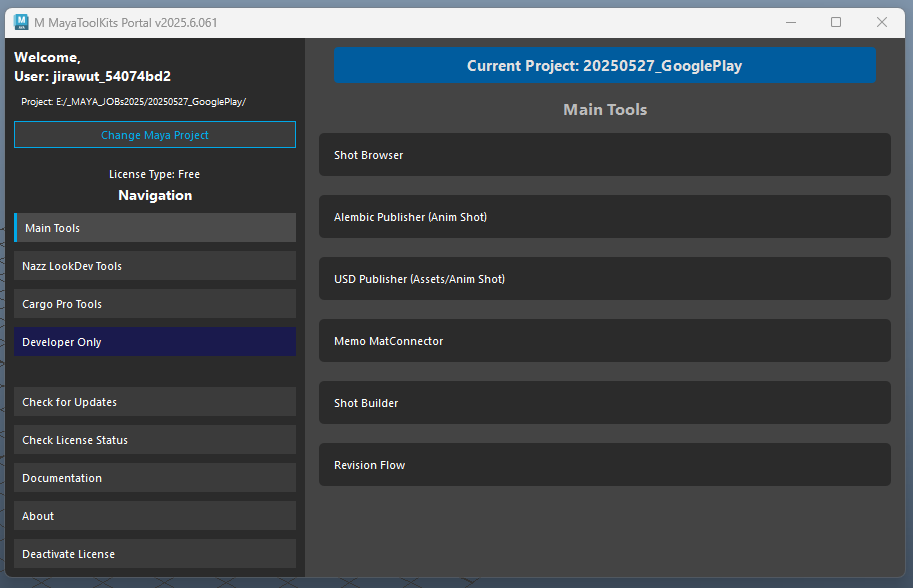
The Tool Portal is the central hub for accessing all M MayaToolKits. It provides license management, tool launching capabilities, and important information about your Maya project environment.

Tool Portal Interface

Main Features

License Management

Activate your license, check its status, request authorization, or request a trial license directly through the portal.

Tool Navigation

Easily access various toolsets including Main Tools, Nazz LookDev Tools, and Cargo Pro Tools via a clear, organized slide-out menu.

Project Awareness

Displays the current Maya project path in the navigation menu and on the main tools page. A blinking label highlights the project folder for clarity.

Project Switching

Quickly switch between Maya's recent projects or browse to select any directory as the current Maya project via a context menu.

Updates & Information

Check for toolkit updates, access documentation, and view "About" information.

Interface Components

1. Login Screen (Initial Launch / Deactivated)

  • Displays current toolkit version.
  • Shows your Machine ID (with an option to reveal the full ID).
  • Activate License: Button to activate your license if you have a key.
  • Request Authorization: Button to request a full license activation code via email.
  • Request Trial License: Button to request a 30-day trial license via email.

2. Main Interface (After Activation)

Slide-Out Menu (Left Side)

  • Current Project Display: Shows the path to the currently set Maya project.
    • Tooltip displays the full project path.
  • Change Maya Project Button: Opens a context menu to:
    • Select from a list of Maya's recent projects.
    • Browse for a new project directory.
  • Welcome message with username and license type.
  • Navigation Buttons:
    • Main Tools
    • Nazz LookDev Tools
    • Cargo Pro Tools
    • (Developer Only tools may appear for authorized users)
  • Management Buttons:
    • Check for Updates
    • Check License Status
    • Documentation (opens online docs)
    • About (shows tool information)
    • Deactivate License (logs out and returns to login screen)

Content Area (Right Side)

  • Displays different pages based on the slide-out menu selection.
  • Main Tools Page:
    • Current Project Label: Prominently displays the current Maya project's folder name (e.g., "Current Project: MyProjectName").
      • This label blinks with alternating background colors when a project is set, serving as a clear reminder.
      • The tooltip shows the full project path.
      • If no project is set, it indicates "No Maya Project Set."
    • Buttons to launch individual tools like Shot Browser, Alembic Publisher, etc.
  • Nazz LookDev Tools / Cargo Pro Tools Pages:
    • Buttons to launch specialized tools within these categories.

How to Use

Initial Setup & Activation

  1. Upon first launch, you will see the login screen.
  2. Your unique Machine ID is displayed. You may need this for license requests.
  3. If you have an activation key, click "Activate License". The portal will verify it.
  4. If you need a license:
    • Click "Request Authorization" to open a pre-filled email to request a full license.
    • Click "Request Trial License", enter your email, and a 30-day trial will be requested.
  5. Once activated, the main interface with tool access will appear.

Launching Tools

  1. Use the slide-out menu on the left to navigate between tool categories (Main Tools, LookDev Tools, etc.).
  2. On the "Main Tools" page (or other tool pages), click the button for the desired tool to launch it.

Managing Maya Project

  1. The Tool Portal helps you keep track of your current Maya project.
  2. The project folder name is prominently displayed and blinks on the "Main Tools" page for easy visibility. The full path is shown in the slide-out menu and in tooltips.
  3. To change the project:
    • Click the "Change Maya Project" button in the slide-out menu.
    • Select a project from the list of recent Maya projects, or
    • Choose "Browse..." to select any folder as your Maya project.
  4. The display will update immediately. This ensures that tools launched from the portal operate within the context of the correct project.

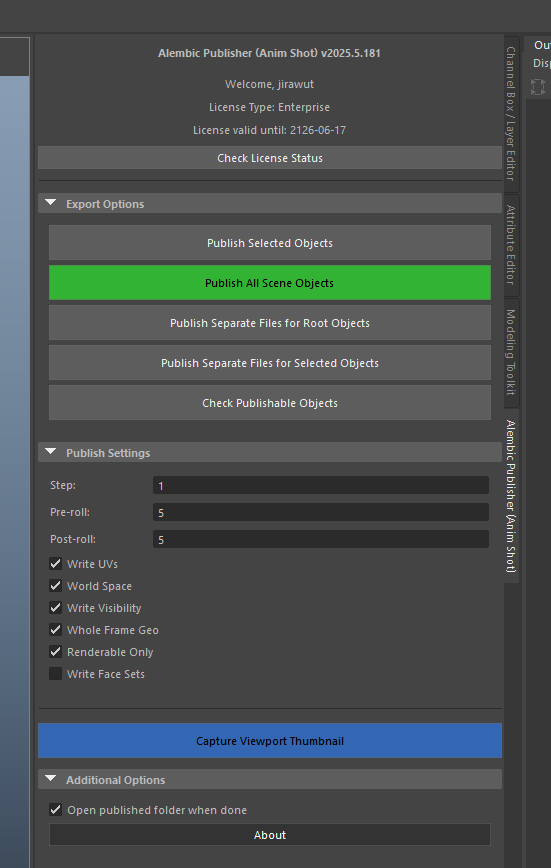
Alembic Publisher (Anim Shot)

The Alembic Publisher (Anim Shot) is a Maya tool designed to streamline the process of exporting animation sequences to Alembic (.abc) format. It provides multiple export options and settings to accommodate different workflow needs.

Alembic Publisher Interface

Installation

Interface Components

1. Header Information

  • Displays tool version
  • Shows user information
  • License type and expiration date

2. Export Options

Publish Selected Objects

  • Exports selected objects into a single Alembic file
  • Output format: shXX_anim.abc
  • Use when you want to export specific objects together

Publish All Scene Objects (One-Click Export)

  • Exports all root-level objects and camera into a single file
  • Output format: shXX_anim.abc
  • Recommended for standard shot exports
  • Highlighted in green as the primary function

3. Publish Settings

Time Range Settings

  • Step: Frame increment for export (default: 1)
  • Pre-roll: Number of frames to add before animation (default: 5)
  • Post-roll: Number of frames to add after animation (default: 5)

Export Options

  • Write UVs: Include UV data (default: On)
  • World Space: Export in world space coordinates (default: On)
  • Write Visibility: Include visibility animation (default: On)
  • Whole Frame Geo: Sample geometry on whole frames (default: On)
  • Renderable Only: Export only renderable geometry (default: On)
  • Write Face Sets: Include face set data (default: Off)

File Naming and Organization

File Structure

  • Files are exported to a _cache or _cache_separate subfolder
  • Shot number is automatically detected from scene name (e.g., "sh01")
  • Version control is automatic (adds _v001, _v002, etc.)

Naming Conventions

  1. Single file export: sh[XX]_anim.abc
  2. Separate files: sh[XX]_anim_[objectName].abc

Best Practices

Scene Preparation

  • Save your scene before exporting
  • Ensure scene name includes shot number (e.g., "sh01")
  • Check camera name contains "cam" or "camera"

Export Process

  • Use "Check Publishable Objects" to verify export selection
  • Consider using pre/post-roll for smooth transitions
  • Choose appropriate export method based on pipeline needs

Technical Notes

Camera Export

  • Automatically includes scene camera in exports
  • Detects cameras with "cam" or "camera" in the name
  • Prompts for selection if multiple cameras found

Version Control

  • Automatically handles file versioning
  • Preserves previous exports
  • Increments version numbers (v001, v002, etc.)

Memo MatConnector

Memo MatConnector is a tool designed to enhance material management within Maya. It provides advanced features for shader operations, material export, and namespace management to streamline your workflow.

Memo MatConnector Interface

Main Features

1. Shader Operations

Record Shaders

Purpose: Captures and stores shader assignments for selected objects

Usage:

  1. Select geometry objects in Maya
  2. Click "Record Shaders from Selection Geometries"
  3. The tool will store both object-level and face-level shader assignments

Advanced Options:

  • Ignore Duplicate Names Check: Option to bypass duplicate name checking (not recommended)
  • Ignore Default Shader Check: Option to bypass default shader checking (not recommended)

Reset Shaders

Purpose: Resets materials to a simple black shader

Usage:

  1. Select objects to reset
  2. Click "Reset Shaders"

Clear Material Data

  • "Clear All Materials Data": Clears stored assignments from all materials in the scene
  • "Clear Selected Materials Data": Available in Debug section for advanced users

2. Material Export

Export Material Networks

Purpose: Exports material networks with their connections and textures

Options:

  • Export Path: Custom Path, Scene Path, or Published (creates _published folder)
  • Copy Textures: Option to copy and relink texture files (experimental)
  • Format: Maya ASCII (.ma) or Maya Binary (.mb)

Important: Namespaces must be removed before exporting

3. Namespace Management

Shader Namespaces

Purpose: Manage and select shaders within specific namespaces

Features:

  • Filter namespaces
  • Multi-select support
  • Quick shader selection within namespaces
  • Double-click to select all shaders in a namespace

Object Namespaces

Purpose: Manage and select objects within specific namespaces

Features:

  • Filter namespaces
  • Multi-select support
  • Quick object selection within namespaces
  • Selection Type Options: All Objects, Only Meshes (default), Only Transforms, or Meshes + Transforms

Assign Shaders with Namespace

Purpose: Apply shaders to objects based on namespace selection

Usage:

  1. Select shader namespaces
  2. Select object namespaces
  3. Click "Assign Shaders to Objects (By Namespace)"

4. Selection Tools

Select All Geometry

Purpose: Quick selection of all geometry in the scene

Usage: Click "Select All Geometry"

5. Debug Options

Purpose: Advanced functionality for troubleshooting

Features:

  • Enable/Disable Debugging
  • Debug Level: Low (1), Medium (2), High (3)
  • Assign Stored Shaders: Direct shader assignment tool
  • Clear Selected Materials Data: Targeted data cleaning

Supported Material Types

Maya Native

  • lambert
  • blinn
  • phong
  • standardSurface
  • surfaceShader
  • useBackground
  • layeredShader
  • rampShader

Redshift

  • RedshiftMaterial
  • RedshiftStandardMaterial
  • RedshiftMaterialBlender
  • RedshiftArchitectural
  • RedshiftCarPaint
  • RedshiftIncandescent
  • RedshiftMatteShadowCatcher
  • RedshiftSkin
  • RedshiftSprite
  • RedshiftSubSurfaceScatter

V-Ray

  • VRayMtl
  • VRayBlendMtl
  • VRayCarPaintMtl
  • VRayFastSSS2
  • VRayLightMtl
  • VRayMtlWrapper
  • VRayPluginNodeMtl
  • VRaySkinMtl
  • VRayStochasticFlakesMtl
  • VRayToonMtl
  • VRayMtl2Sided
  • VRayMtlOSL
  • VRayAlSurface

Best Practices

1. Shader Recording

  • Use "Select All Geometry" for complete scene recording
  • Avoid selecting objects with default materials
  • Clear existing shader data before recording if needed

2. Material Export

  • Remove all namespaces before exporting materials
  • Use the "Published" path option for organized exports
  • Use Maya ASCII format for better compatibility

3. Namespace Operations

  • Keep "Only Meshes" selection type whenever possible
  • Use namespace filtering for complex scenes
  • Apply shaders to limited selections for predictable results

4. General Workflow

  • Save your scene before major operations
  • Clear material data when no longer needed
  • Use progress bars to monitor long operations

Troubleshooting

1. No Shaders Found

  • Check for supported shader types
  • Verify namespace visibility
  • Ensure proper selection

2. Duplicate Names Warning

  • Resolve duplicate object names in your scene
  • Use long paths (full paths) for selection
  • Only bypass if you're certain about your scene structure

3. Default Materials Warning

  • Assign proper materials to objects using default shaders
  • Default shaders include: lambert1, particleCloud1, shaderGlow1, standardSurface1

4. Export Errors

  • Remove namespaces before exporting
  • Verify write permissions for export path
  • Check for valid file paths

5. Debug Mode

  • Enable debugging for detailed operation logs
  • Increase debug level for more verbose information
  • Use assign stored shaders for direct control

Shot Browser

The Shot Browser is a visual file management tool designed to help Maya artists navigate, create, version, and open scene files across different departments. It provides a thumbnail-based interface for quickly finding and accessing shots, now with enhanced scene management capabilities and personalized experience.

Shot Browser Interface

Video Short Preview

Watch our video short preview on using the Shot Browser tool:

Main Features

Department & Sequence Navigation

Easily switch between departments. For "sh" type departments (Animation, Lighting, etc.), further organize and browse shots within sequences (e.g., SQ010).

Visual Thumbnails (Static & GIF)

Visual preview of shot content with version information. Supports static thumbnail.jpg and animated thumbnail.gif (plays on hover or via "Play All GIFs").

Version History & Management

Access and sort shot versions by modification time. Easily save new versions of the currently open scene with automatic version incrementing.

Smart File Operations

Prompts to save current work before opening or creating new files. Intelligently finds the next available version number when saving.

New Scene Creation

Quickly set up new shots or assets with smart, department-aware naming conventions and automatic folder creation, including sequence folders.

Customizable View & Preferences

Adjust thumbnail sizes with a slider. "Play All GIFs" option. Remembers last used department and sequence for a personalized workflow.

Context Menu Actions

Right-click on thumbnails for quick actions: Open, Browse, Create GIF, Import Thumbnail, Export Scene, and Archive Scene for advanced data management.

Interface Components

1. Department Selector

Dropdown menu to select from available departments:

  • 00_Model
  • 01_Anim
  • 02_Setup
  • 03_Lookdev
  • 04_Track
  • 05_EFX
  • 09_Lighting

Each department uses appropriate naming conventions. The browser remembers your last selected department.

2. Sequence Selector (for "sh" type departments)

For departments like Animation, Lighting, Track, and EFX, a "Sequence" dropdown appears:

  • Allows browsing and creating shots within specific sequences (e.g., SQ010, SQ020).
  • The browser remembers the last selected sequence for each department.

3. Control Bar

Contains several actions and display options:

  • Refresh Button: Reloads the shot list for the current department/sequence.
  • Create New Scene Button: Opens a dialog to create a new shot or asset scene with smart naming.
  • Save New Version Button: Saves the currently open Maya scene as a new, incremented version.
  • Play All GIFs Checkbox: Toggles playback of all visible animated thumbnail.gif files.
  • Thumbnail Size Slider: Adjusts the display size of shot thumbnails in the grid.

4. Shot Grid

Visual grid of shots/assets. Each item displays:

  • Shot/asset name (e.g., sh0010_anim or mdl0100_characterA).
  • Latest version number (e.g., "v001").
  • Visual thumbnail (thumbnail.jpg or animated thumbnail.gif). GIFs play on hover (if "Play All GIFs" is off) or all at once (if "Play All GIFs" is on).

Double-click to open the version selection dialog for a shot/asset.

Right-click on a thumbnail to access a context menu with options:

  • Open Shot: Opens the version selection dialog.
  • Browse Shot Folder: Opens the shot's folder in your system's file explorer.
  • Create GIF Thumbnail: Launches the GIF Converter tool, pre-configured to save a thumbnail.gif in the shot's _cache folder.
  • Import JPG Thumbnail: Allows you to select a custom JPG image to use as the thumbnail. This is useful for personalizing the visual preview of a shot or asset.
  • Export Scene File (Copy): Copies the latest version of the Maya scene file (.ma or .mb) to a location of your choice. A quick way to make a backup or share the scene file.
  • Archive Scene (to .zip): Packages the latest version of the Maya scene and all its dependencies (textures, references, etc.) into a single, portable .zip file. Perfect for sharing a complete shot or for archival.

5. Version Selection Dialog

  • Lists all available Maya scene file versions (.ma) for a selected shot/asset.
  • Shows file name and last modified date/time.
  • Sorted by modification time (newest first).
  • Double-click or press "Open" to load the selected version into Maya.

6. Status Bar

  • Displays current operations, confirmations, and error messages.

How to Use

Browsing and Opening Files

  1. Launch Shot Browser through the Tool Portal.
  2. Select the appropriate department from the "Department" dropdown.
  3. If applicable (e.g., for Animation, Lighting), select a "Sequence" from the dropdown that appears. If no sequences exist for a new project, you can create them using the "Create New Scene" workflow.
  4. Browse the visual grid of shots/assets. Hover over items with thumbnail.gif to see animations (if "Play All GIFs" is off).
  5. Adjust thumbnail size using the slider for better viewing.
  6. Optionally, check "Play All GIFs" to see all animated thumbnails play simultaneously.
  7. Double-click on a shot/asset to view available versions in the Version Selection Dialog.
  8. In the dialog, select a version and click "Open" (or double-click the version) to load it in Maya. The tool will prompt to save unsaved changes in your current scene.
  9. Alternatively, right-click a thumbnail for quick actions like "Open Shot", "Browse Shot Folder", or "Create GIF Thumbnail".

Creating a New Scene

  1. Select the desired Department.
  2. Click the "Create New Scene" button.
  3. If in an "sh" type department (e.g., Animation, Lighting):
    • You'll be prompted to enter a "Sequence Name" (e.g., SQ010). You can enter a new name or an existing one. The system suggests a new name based on existing sequences or a default if none exist. The last used sequence may be pre-filled.
    • A folder for this sequence will be created under the department folder if it doesn't exist.
  4. You'll be prompted to enter a "Shot/Asset Number" (e.g., 0010). The system suggests the next available number based on existing items in the selected department/sequence.
  5. If in an asset-based department (e.g., Model, Setup, Lookdev), you'll be prompted for an "Object Name" (e.g., characterA, prop_table).
  6. The tool will then:
    • Create the necessary folder structure (e.g., scenes/09_Lighting/SQ010/sh0010_light/ or scenes/00_Model/mdl0100_characterA/).
    • Create a new Maya scene file with a smart name (e.g., sh0010_light_v001.ma or mdl0100_characterA_v001.ma).
    • Save this new, empty scene and open it in Maya.
  7. The Shot Browser will refresh to show the newly created item.

Saving a New Version

  1. Have a Maya scene open that follows the tool's naming convention (e.g., shotName_v001.ma).
  2. Click the "Save New Version" button.
  3. The tool will prompt to save any unsaved changes in the current file.
  4. It will then determine the next available version number (e.g., if _v001.ma is open, it will propose _v002.ma. If _v002.ma already exists, it will propose _v003.ma, and so on).
  5. A confirmation dialog will show the new version name.
  6. Upon confirmation, Maya will save the current scene under the new version name.
  7. The Shot Browser will refresh to reflect the new version.

Thumbnails (Static and Animated)

The tool looks for thumbnails in the following locations within each shot/asset folder (e.g., sh0010_anim/):

  • Root: thumbnail.jpg or thumbnail.gif
  • _cache folder: _cache/thumbnail.jpg or _cache/thumbnail.gif
  • _cache_separate folder: _cache_separate/thumbnail.jpg or _cache_separate/thumbnail.gif

If no thumbnail is found, a default file icon will be displayed. thumbnail.gif files will animate on hover (or all at once if "Play All GIFs" is enabled). Use the right-click "Create GIF Thumbnail" option to easily generate these using the GIF Converter tool.

Technical Notes

Maya Project Integration

  • Automatically detects the current Maya project workspace.
  • Navigates to the "scenes" folder within the project.
  • Requires a standard Maya project structure.

Directory Structure & Naming Conventions

The tool expects and creates specific directory structures and naming:

  • Departments: Top-level folders under scenes/ (e.g., 01_Anim/, 09_Lighting/).
  • Sequences (for "sh" types): Subfolders within "sh" type departments (e.g., scenes/01_Anim/SQ010/). Created via "Create New Scene".
  • Shot/Asset Folders:
    • For "sh" types (Animation, Lighting, Track, EFX): prefixNUMBER_deptshortname (e.g., sh0010_anim, sh0020_light). Located inside sequence folders.
    • For asset types (Model, Setup, Lookdev): prefixNUMBER_objectname (e.g., mdl0100_characterA, rig0020_heroProp). Located directly inside department folders.
  • Scene Files: Named same as their parent shot/asset folder, plus version (e.g., sh0010_anim_v001.ma, mdl0100_characterA_v001.ma).

Version Detection

  • Automatically detects version numbers from Maya scene file names (.ma).
  • Looks for pattern: _vXXX.ma (e.g., _v001.ma, _v002.ma).
  • Displays the highest version number on the shot/asset thumbnail.
  • "Save New Version" intelligently finds the next available integer for versioning.

Preferences File

  • The Shot Browser saves user preferences to a JSON file: [User_Maya_App_Dir]/mmayatoolkits_shotbrowser_pref.json.
  • Preferences stored include:
    • Last selected department.
    • Last selected sequence for each "sh" type department.
    • (Potentially other UI settings in the future).

Best Practices

File Organization

  • Utilize the "Create New Scene" feature to ensure consistent naming and folder structures.
  • For "sh" type departments, organize your work into sequences (e.g., SQ010, SQ020) using the "Create New Scene" workflow.
  • Regularly use the "Save New Version" button to maintain a clear version history.
  • Create thumbnails for your shots/assets:
    • thumbnail.jpg for a static preview.
    • thumbnail.gif for an animated preview. Use the right-click "Create GIF Thumbnail" option for easy generation. Place these in the shot/asset folder or its _cache subfolder.

Workflow Integration

  • Use the Shot Browser as your primary tool for navigating, creating, and versioning shots/assets.
  • Leverage the remembered department and sequence settings to quickly return to your work.
  • Use the thumbnail size slider and "Play All GIFs" option to customize your browsing experience.

Shot Builder

The Shot Builder is a Maya utility designed to streamline the process of managing and referencing files in Maya projects. It provides a visual interface for browsing, filtering, and referencing files with version control capabilities, and advanced tools for assembling shots with automatic material connections.

Shot Builder Interface

Video Short Preview

Watch our video short preview on using the Shot Builder tool in Advanced Mode just one-click in few seconds:

Features

Visual File Browser

Browse files with large thumbnail previews (128x128) for quick identification. Right-click folders to view `thumbnail.jpg` or explore in the file system.

Advanced Filtering & Grouping

Powerful folder and file filtering with keywords (AND/OR logic). Dynamic lists for Department, Sequence, and Shot groups allow quick, targeted browsing. Dedicated list for Lookdev Shader files. Auto-completion for filter inputs.

Version Control & Referencing

Manage multiple file versions. View "Reference Status" and switch between available versions directly in the list for referenced files.

Bulk Operations & Shot Assembly

Import multiple files as references. Use "Build Shot Advanced" to import working files (including `_shd.ma` shaders) with automatic material connections via `Memo MatConnector`.

Context Menu & UI

Right-click files/folders to "Explore Folder". File scanning occurs in a background thread for a responsive UI.

Installation

The tool should be run through the Tool Portal with a valid license. It cannot be launched directly as a standalone script.

Interface Components

Filter Section

  • Filter Folders: Input field to filter folder names. Supports comma (,) for OR logic and asterisk (*) for AND logic between different groups (e.g., (departmentA,departmentB)*(sequenceX,sequenceY)). Auto-completion suggests folder names.
  • Filter Files: Input field to filter file names. Supports comma (,) for OR logic and asterisk (*) for AND logic. Auto-completion suggests file names.
  • Department Groups: Select from a list of identified department folders (e.g., "09_Lighting", "00_Model") to filter your view. Multiple selections are combined with OR.
  • Sequence Groups: Select from a list of identified sequence identifiers (e.g., "SQ010", "EP002") found in folder paths. Multiple selections are combined with OR.
  • Shot Groups: Select from a list of shot identifiers (e.g., "SH001", "SH1234") found in filenames. Multiple selections are combined with OR.
  • Lookdev Shader Files List: A dedicated list shows all *_shd.ma files from 'lookdev' folders for quick selection. Multiple selections are combined with OR.

// Folder Filter Example: (09_Lighting,00_Model)*(SQ010,SQ020)

// This would show files in (09_Lighting OR 00_Model) AND (SQ010 OR SQ020)

// File Filter Example: characterA_body_v*,characterA_head_v*

// This would show files matching "characterA_body_v" AND "characterA_head_v"

// File Filter Example using selections from Shot Groups & Lookdev Shader lists: SH005,myAsset_shd.ma

// This would show files matching SH005 OR myAsset_shd.ma

Filter Options (Checkboxes)

  • Exclude files containing '_anim_v': (Default: On) Hides files with "_anim_v" in their name.
  • Exclude folders containing 'anim': (Default: Off) Hides folders with "anim" in their name.
  • Show only folders for current shot name: (Default: On) Displays only folders relevant to the currently open Maya scene's shot name (e.g., "shXX").
  • Show only folders for lookdev: (Default: Off) Displays only folders containing "lookdev" in their name.
  • Show only lookdev shader files (*_shd.ma): (Default: Off) Displays only *_shd.ma files from folders containing "lookdev". The count of found files is displayed next to the checkbox.
  • Include Lookdev Folders (override filters): (Default: On) When checked, lookdev folders will be shown even if other active filters would normally hide them.

File Tree

  • Displays folders and files based on active filters.
  • Columns: Folder/File name, Size, Date Modified, Reference Status, Available Versions.
  • Thumbnails (128x128) are shown for folders if a `thumbnail.jpg` exists within them.
  • Reference Status: Indicates if a file is currently referenced in the scene ("Referenced" in green, "Not Referenced" in grey).
  • Available Versions: If multiple versions of a file are found (e.g., `_v001`, `_v002`, `latest`), a dropdown (ComboBox) appears, allowing you to switch the referenced version directly.
  • Right-click on a file or folder to open a context menu:
    • Explore Folder: Opens the selected item's containing folder in the system file explorer.
    • View Thumbnail: (For folders with `thumbnail.jpg`) Opens the thumbnail image.

Action Buttons

  • Import Selected Files As References: Imports all checked files into the current Maya scene as references.
  • Select All Visible: Checks all files currently visible in the tree.
  • Clear Selection: Unchecks all files currently visible in the tree.
  • Invert Selection: Inverts the check state of all files currently visible in the tree.
  • Build Shot Advanced: Imports selected files (including `_shd.ma` shader files) and attempts to automatically connect materials using `Memo MatConnector` logic.

How to Use

Basic Navigation and Referencing

  1. Launch through Tool Portal. The tool will scan your project for relevant files in the background.
  2. Use the "Filter Folders" and "Filter Files" input fields to narrow down the list with keywords.
    • For "Filter Folders": Combine selections from "Department Groups" and "Sequence Groups" lists (AND logic between groups, OR logic within a group). The text field will update automatically, e.g., 09_Lighting*SQ010. You can also type manually using this syntax.
    • For "Filter Files": Combine selections from "Shot Groups" and "Lookdev Shader Files" lists (OR logic). The text field will update, e.g., SH005,myAsset_shd.ma. You can also type manually.
    • Both filter fields support auto-completion.
  3. Utilize the filter checkboxes to further refine the displayed items (e.g., show only current shot, exclude certain patterns, focus on lookdev). Note that "Include Lookdev Folders" can override other folder filters.
  4. Click folders to expand/collapse them (folders are expanded by default). Folder rows with thumbnails are larger, while file rows are more compact for visibility.
  5. Right-click on folders to "View Thumbnail" (if available) or "Explore Folder". Right-click on files to "Explore Folder".
  6. Check the boxes next to files you want to work with. Use "Select All", "Clear Selection", or "Invert Selection" for faster multi-selection.
  7. View the "Reference Status" column to see if a file is already referenced.
  8. For referenced files with multiple versions, use the dropdown in the "Available Versions" column to switch to a different version. The reference in your scene will update.
  9. Click "Import Selected Files As References" to bring checked files into your scene.

Advanced Shot Building ("Build Shot Advanced")

  1. Select the asset files and any corresponding shader files (e.g., `_shd.ma`) you want to build your shot with.
  2. Click the "Build Shot Advanced" button.
  3. The tool will:
    • Import all selected files as references.
    • If `Memo MatConnector` is available and shader files (`*_shd.ma`) were included, it will attempt to automatically connect materials between the referenced assets and shaders based on their namespaces.
    • A message will indicate if the shader connection process was initiated.
  4. This is particularly useful for quickly assembling assets and their look development into a lighting scene.

Revision Flow

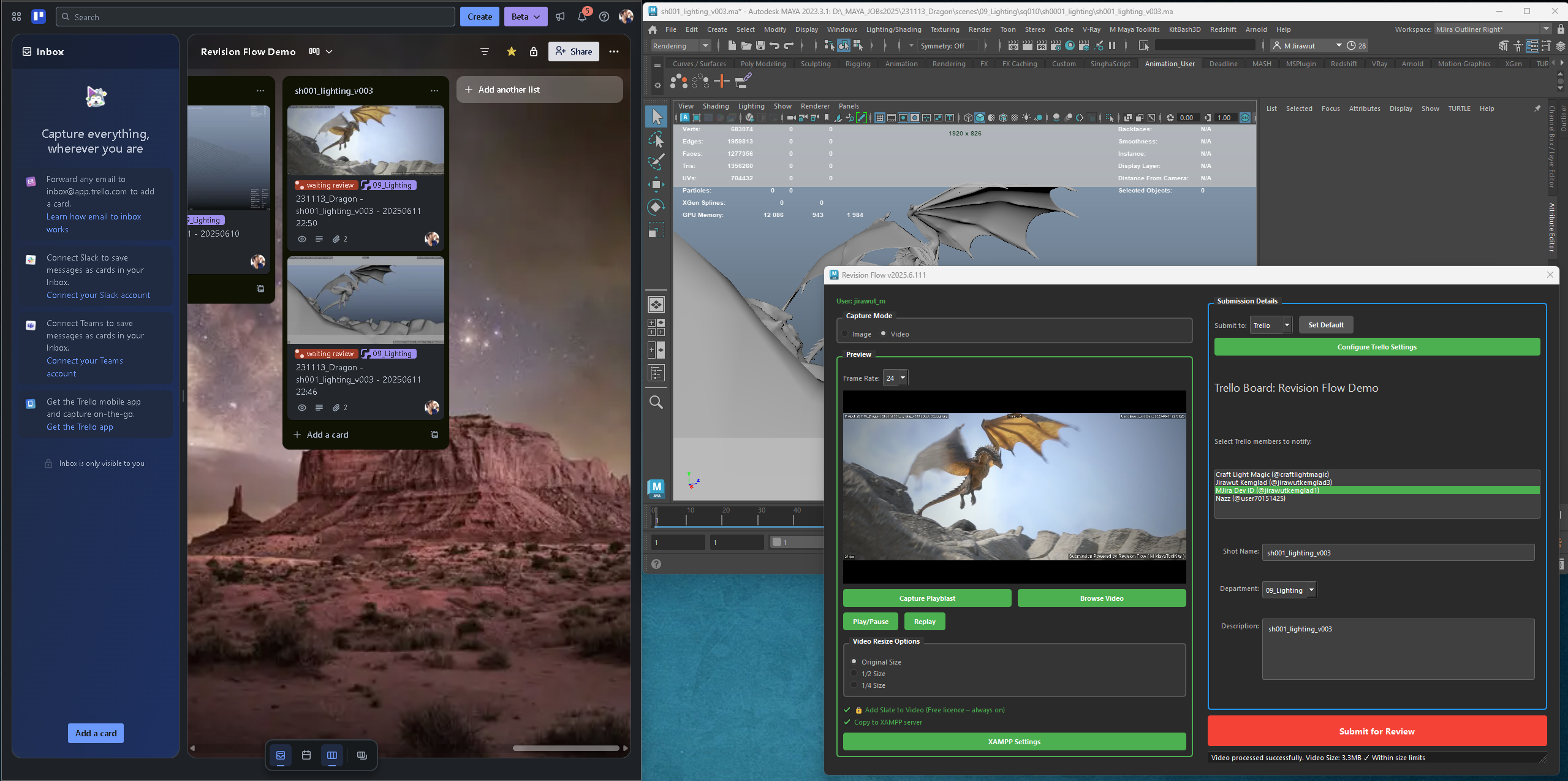
The Revision Flow tool streamlines the process of capturing, preparing, and sharing work-in-progress directly from Maya. It supports multiple platforms including Discord and Trello, with advanced features for both image and video submissions, file size management, and team collaboration.

Revision Flow Interface
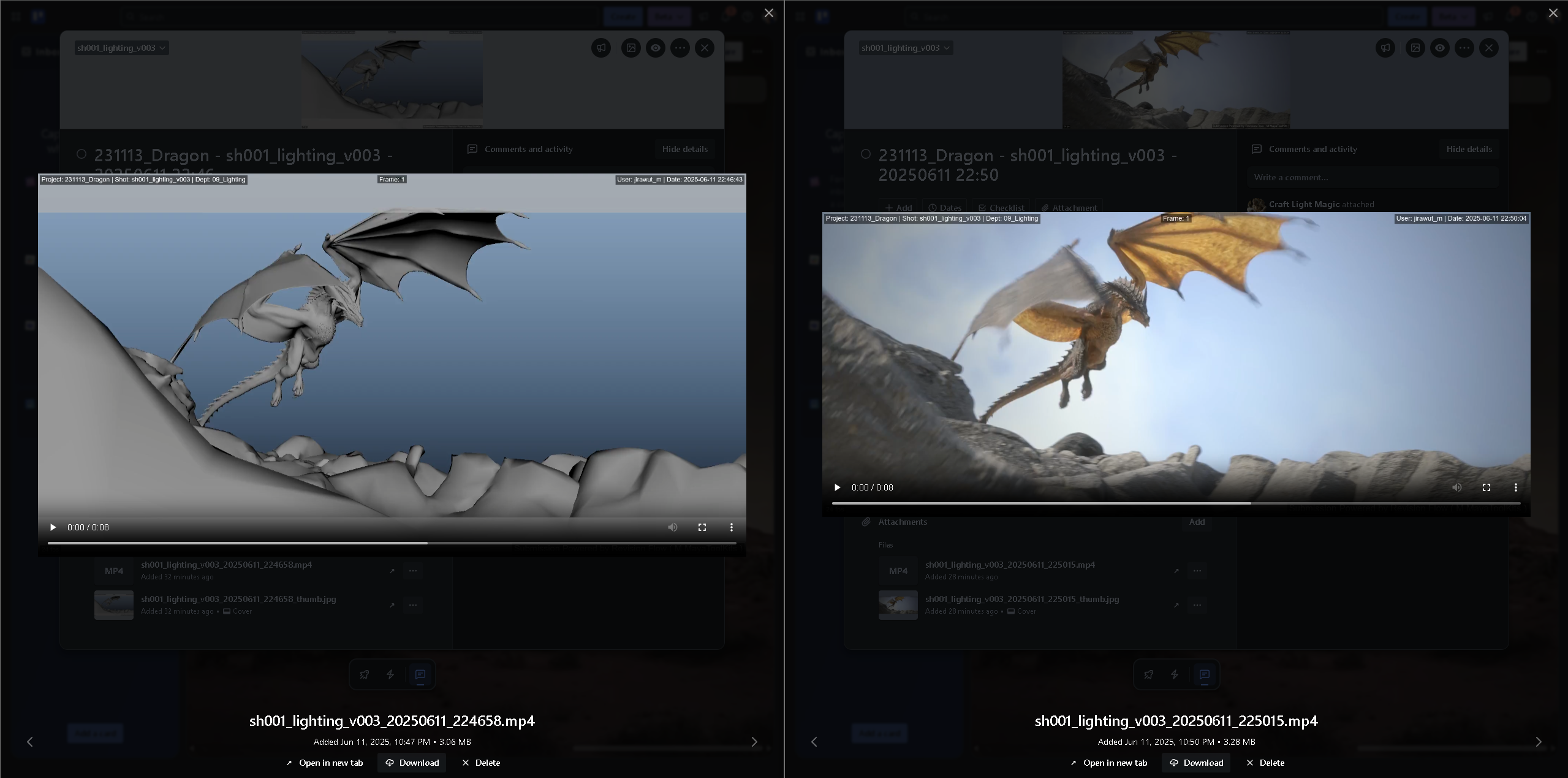
Revision Flow Slate Burn-in Example

Slate burn-in overlay example generated by Revision Flow

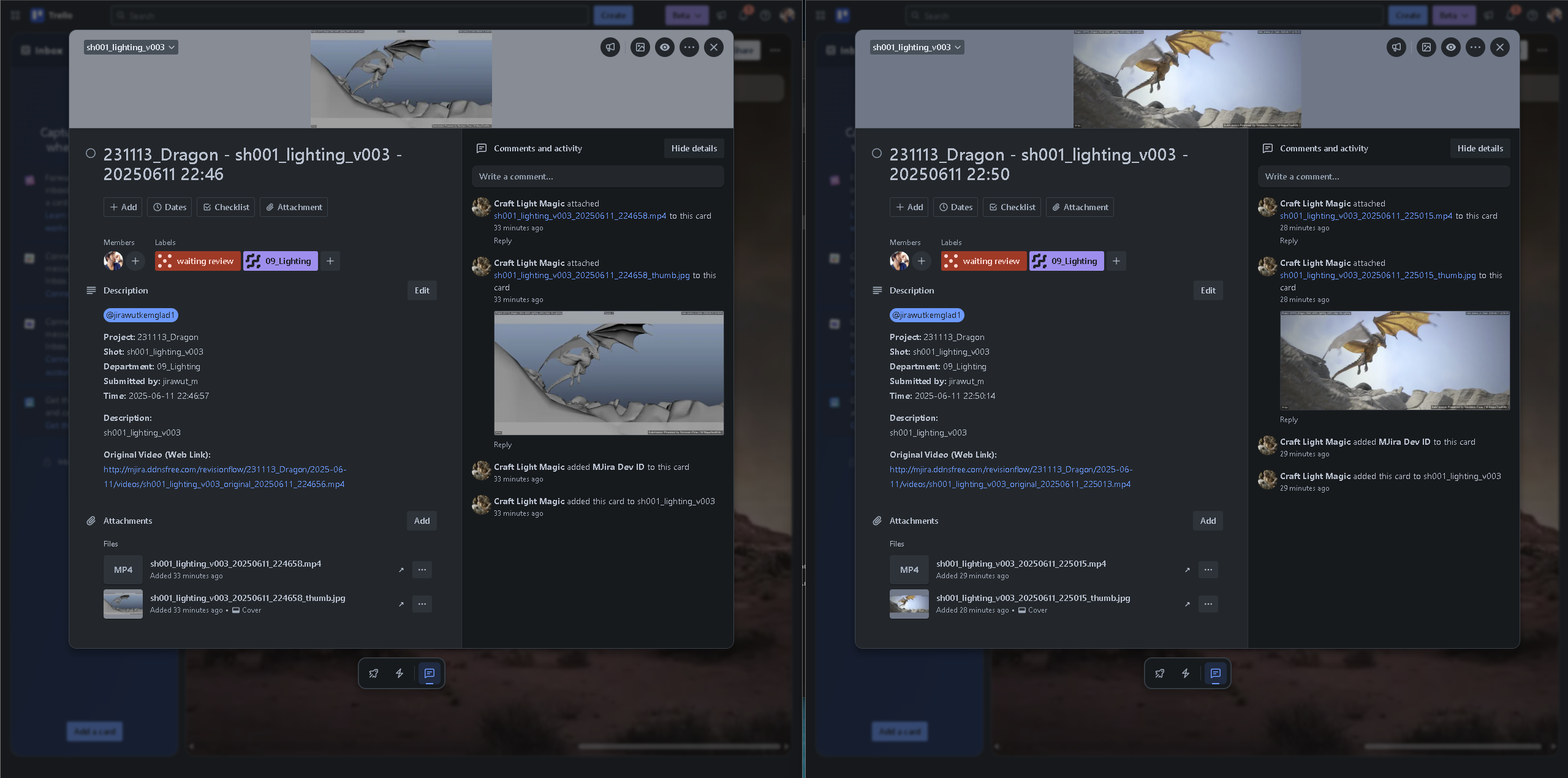
Revision Flow Trello Card with Comments and Annotation

Trello card created via Revision Flow – supports comments & annotations

Revision Flow Build 2025.6.111 - Playblast Submit to Trello

↳ View on Trello Demo Board

Revision Flow Build 2025.6.111 - Video Sequence Submit to Trello

↳ View on Trello Demo Board

Video Demo using Revision Flow to discord (old GUI - build 2025.05.221)

Watch our complete demo on using the Revision Flow tool to submit to discord:

Main Features

Viewport Capture

Instantly capture the current Maya viewport as a high-quality image with adjustable quality and resolution settings

Video Playblast & Processing

Create professional playblasts with video resize options, automatic backup, and web hosting integration

Multi-Platform Integration

Submit to Discord channels or Trello boards with platform-specific optimizations and file size management

Smart Team Collaboration

Intelligent shot and department detection with team member notifications and project-based organization

Interface Components

1. User Information & Mode Selection

  • User Display: Shows the current logged-in user from license information
  • Capture Mode: Radio buttons to select between "Image Capture" and "Video Sequence" modes
  • Intuitive Interface: Mode selection is prominently positioned for easy workflow switching

2. Preview Section

  • Capture Viewport: Take a snapshot of the current viewport (Image mode)
  • Capture Playblast: Create a video playblast of the animation timeline (Video mode)
  • Browse Video: Select an existing video file for submission (Video mode)
  • Frame Rate: Select from common frame rates (24, 25, 30, 60 fps) for video capture
  • Preview Window: Displays captured content with playback controls for videos
  • Video Resize Options: Choose Original, 1/2 Size, or 1/4 Size for submission optimization
  • Web Hosting Integration: Option to copy original videos to web server for public access

3. Image Settings

  • JPEG Quality: Adjustable slider (default: 80%)
  • Max Resolution: Preset resolutions (1920x1080, 1280x720, 2560x1440, 3840x2160)
  • Lock Controls: Option to lock settings at default values for consistency

4. Submission Details

  • Platform Selection: Choose between Discord and Trello for submission
  • Discord Configuration:
    • Webhook management for Discord channels
    • User management for team member notifications
    • Support for multiple Discord servers and channels
  • Trello Configuration:
    • Board integration with automatic list creation
    • Team member selection with proper mentions
    • Card creation with rich descriptions and attachments
  • Smart Detection:
    • Shot name automatically detected from scene name (supports sh###, mdl_*, lkd_*, rig_* patterns)
    • Department auto-detection based on scene name keywords
    • Enhanced support for various project naming conventions
  • Description: Rich text field for describing work and feedback requirements

How to Use

Getting Started

  1. Launch the Revision Flow tool from the Tool Portal
  2. Your username will be automatically displayed at the top
  3. Choose your capture mode using the radio buttons: "Image Capture" or "Video Sequence"
  4. Select your submission platform: Discord or Trello

Image Capture Workflow

  1. Select the "Image Capture" radio button
  2. Set up your Maya viewport to show the desired camera angle
  3. Adjust image settings if needed (quality and resolution)
  4. Click "Capture Viewport" to take a snapshot
  5. The tool will automatically detect shot name and department from your scene
  6. Fill in the description and select team members to notify
  7. Click "Submit for Review"

Video Capture Workflow

  1. Select the "Video Sequence" radio button
  2. Set your animation timeline to the desired frame range
  3. Select the appropriate frame rate (24, 25, 30, or 60 fps)
  4. Choose video resize option if needed to meet platform file size limits
  5. Optionally enable web hosting for original video backup
  6. Click "Capture Playblast" to create a video
  7. Preview the video using the playback controls
  8. Complete the submission details and click "Submit for Review"

Using External Video

  1. Select the "Video Sequence" radio button
  2. Click "Browse Video" to select an existing video file
  3. The video will be processed and displayed in the preview window
  4. Choose resize options if the file exceeds platform limits
  5. Complete the submission details and submit

Platform Configuration

  1. Discord Setup: Click "Manage Discord Webhooks" to configure channels and "Manage Discord Users" for team notifications
  2. Trello Setup: Click "Configure Trello Settings" to set up API credentials and board access
  3. Web Hosting: Click "Configure Web Server Settings" to set up automatic video backup and public URL generation

Platform Configuration

Discord Configuration

Managing Discord Webhooks

  1. Select "Discord" as your submission platform
  2. Click "Manage Discord Webhooks" in the Submission Details section
  3. In the Webhook Manager dialog, click "Add Webhook"
  4. Enter a channel name and the Discord webhook URL
  5. Click OK to save the webhook
  6. Select the webhook from the dropdown list to make it active

Discord webhook URLs must start with "https://discord.com/api/webhooks/" or "https://discordapp.com/api/webhooks/".

Managing Discord Users

  1. Click "Manage Discord Users" in the Submission Details section
  2. In the User Manager dialog, click "Add User"
  3. Enter a user name and the Discord user ID
  4. Click OK to save the user
  5. The user will appear in the notification list for selection

Discord user IDs are numeric values. To get a user's ID in Discord, enable Developer Mode in Discord settings, then right-click on a user and select "Copy ID".

Trello Configuration

Setting Up Trello Integration

  1. Select "Trello" as your submission platform
  2. Click "Configure Trello Settings"
  3. Get your API Key from the Trello developer portal
  4. Generate a Token using the provided link
  5. Enter your Board ID (found in the board URL)
  6. Test the connection to verify your settings
  7. Click OK to save the configuration

Board members will be automatically detected and available for selection. The tool will create lists for shots automatically if they don't exist.

Web Hosting Configuration (XAMPP/FTP)

Setting Up Video Backup & Public Access

This powerful feature allows you to automatically back up the original, full-quality video to a web-accessible server and include a public link in your review submission. This is especially useful for sharing large files without being constrained by platform attachment limits.

  1. Switch to "Video Sequence" mode in the main interface.
  2. Click the "XAMPP Settings" button (The name will be updated to "Server Settings" in a future release).
  3. The configuration dialog provides two methods for file transfer: Local Directory Copy and FTP Upload.
Method 1: Local Directory Copy (e.g., to a XAMPP Server)
  1. In the "Local Directory Copy" tab, provide the absolute local file path to your server's public directory (e.g., D:\\xampp\\htdocs\\reviewsubmission).
  2. Enter the corresponding public base URL (e.g., http://your-server.com/reviewsubmission).
  3. This method is ideal when you are running the tool on the same machine as your web server or have direct network access to its file system.
Method 2: FTP Upload (Recommended for Remote Servers)
  1. Navigate to the "FTP Upload" tab.
  2. Check "Enable FTP Upload" to activate this feature.
  3. Fill in your FTP server details: Host, User, and Password.
  4. Specify the "FTP Remote Base Path"—the root directory on the server where files will be uploaded (e.g., /public_html/reviews).
  5. Provide the "Public URL Base (FTP)" that corresponds to the remote path.
  6. Click "Test FTP Connection" to verify your settings.
  7. You can set FTP to be the default copy method via the "Use FTP for 'Copy to Server' by default" checkbox.

How it Works: When you submit a video with "Copy to Server" enabled, the tool will first check if FTP is enabled and set as the default. If so, it will upload via FTP. Otherwise, it will fall back to the local directory copy method. A public URL to the original video will be added to your Discord or Trello post for easy access.

Technical Notes

File Handling & Storage

  • Temporary files are created in the Maya project directory
  • Files are automatically cleaned up when the tool is closed
  • Images use JPEG format with adjustable quality settings
  • Videos are encoded using H.264/MP4 format for platform compatibility
  • Original videos are backed up to project-specific directories with timestamp organization
  • File size validation prevents uploads that exceed platform limits (Discord: 8MB, Trello: 10MB)

Video Processing & Optimization

  • Advanced video processing with resize options (Original, 1/2, 1/4 size). This creates a smaller version of the video specifically for the submission payload to meet platform file size limits (e.g., Discord's 8MB limit).
  • The original, full-quality playblast is what gets copied to your web server (XAMPP or FTP) if you have that option enabled.
  • Intelligent file size management with real-time feedback.
  • Web-optimized encoding for fast streaming and compatibility.
  • VLC integration for high-quality video preview within the tool.
  • Support for standard frame rates with automatic timeline detection.

Platform Integration

  • Multi-platform architecture supporting Discord and Trello
  • Platform-specific optimizations and file handling
  • Trello Automation:
    • Automatically generates a thumbnail from the video's first frame and sets it as the Trello card cover.
    • Creates and applies a red "waiting review" label to new cards for clear status tracking.
    • Creates and applies a dark purple label corresponding to the submission's department for better organization.
  • Rich metadata embedding with project and user information

Configuration & Data Management

  • Username automatically sourced from license information
  • Separate configuration files for different platforms and services
  • Secure credential storage with connection validation
  • Project-aware file organization and naming conventions

Best Practices

Interface & Workflow

  • Use the radio buttons to clearly select your capture mode before starting
  • Take advantage of automatic shot and department detection by using consistent naming
  • Configure your preferred platform settings once for streamlined future submissions
  • Test platform connections before important submissions

For Image Captures

  • Use the default 80% JPEG quality for optimal balance of quality and file size
  • Consider lower resolutions (1280x720) for faster uploads and smaller files
  • Ensure proper lighting and camera angles before capturing
  • Lock image settings to maintain consistency across submissions

For Video Captures

  • Keep playblasts concise (under 30 seconds when possible) for better engagement
  • Use video resize options when files exceed platform limits
  • Enable web hosting for original video backup when working with large files
  • Match frame rate to your project requirements (24fps for film, 30fps for broadcast)
  • Preview videos before submission to ensure quality

Platform Selection

  • Discord: Best for quick feedback and team communication
  • Trello: Ideal for organized project tracking and formal reviews
  • Consider file size limits when choosing platforms (Discord: 8MB, Trello: 10MB)

Submission Etiquette

  • Provide clear, specific descriptions of what feedback you need
  • Only mention team members who need to review your work
  • Use consistent shot naming and department classification
  • Include context about the stage of work (WIP, final, etc.)

What's New – Build 2025.6.111 (2025-06-11)

  • Add Slate to Video: Optional burn-in overlay now available for playblasts and re-encoded videos, displaying project, shot, department, frame counter, user/date, FPS, and a "Powered by Revision Flow" tagline.
  • Add Slate to Image: Equivalent metadata overlay for viewport screenshots with customizable visibility based on licence.
  • Threaded Uploads: Discord and Trello submissions run in background threads with indeterminate progress dialogs, ensuring the UI never freezes.
  • Licence Awareness: Slate options are always enabled (and locked) for Free users, while Pro & Enterprise users can toggle them.
  • Refinements & Bug Fixes: Accurate date-time stamps, robust FFmpeg string escaping, corrected framerate variable, larger tagline font for images, and automatic cleanup of lingering dialogs.

USD Publisher (Assets/Anim Shot) - Still in Development

The USD Publisher is a Maya tool designed for exporting scene data to the Universal Scene Description (USD) format. It caters to both asset and animation shot workflows, offering options for single-file and separate-file exports with render engine-specific settings.

USD Publisher Interface

Installation

Interface Components

1. Header Information

  • Displays tool version
  • Shows user information (username, license type, expiration date)
  • Button to check current license status

2. Export Options

Publish Selected Objects (Experimental)

  • Exports only the currently selected objects into a single USD file
  • Marked as experimental, especially for Maya 2025
  • Useful for testing or exporting specific parts of a scene

3. Publish Settings

General Settings

  • Type: Checkbox to switch between "Asset Mode" (uses scene name) and "Shot Mode" (uses shXX pattern).
  • Export UVs: Include UV data (default: On)
  • Export Color Sets: Include color set data (default: On)
  • Export Visibility: Include visibility animation (default: On)
  • Render Engine: Select between Redshift and V-Ray for material conversion.

Animation Settings

  • Frame Range: Choose between "Current Scene" range or specify a "Custom" range.
  • Start Frame: Defines the starting frame for animation export.
  • End Frame: Defines the ending frame for animation export.

4. Additional Options

  • Use custom filename: Checkbox to enable manual naming of the output USD file.
  • Custom name: Text field to input the desired filename (enabled when checkbox is ticked).
  • Open published folder when done: Automatically opens the output folder in Windows Explorer after export (default: On).

How to Use

Exporting Selected Objects (Experimental)

  1. Select the objects you wish to export in the Maya scene.
  2. Configure the desired Publish Settings (Type, Render Engine, Frame Range, etc.).
  3. Optionally, enable "Use custom filename" and provide a name.
  4. Click the "Publish Selected Objects" button.
  5. The tool will export the selection to a single USD file in the `_usd` subfolder.

File Naming and Organization

Output Folder

  • By default, files are exported to a `_usd` subfolder relative to the Maya scene file.
  • If the scene is unsaved, exports go to `~/maya/USD_exports` or `~/Desktop/USD_exports` as a fallback.

Naming Conventions

  • Shot Mode (Default): sh[XX]_anim.usd (e.g., `sh01_anim.usd`). The shot number is derived from the scene name.
  • Asset Mode: Uses the Maya scene filename directly (e.g., `myAssetName.usd`).
  • Custom Filename: Uses the name provided in the "Custom name" field.

Note: The tool does not automatically handle versioning (e.g., _v001). If a file with the same name exists, it might be overwritten (or renamed depending on implementation details not fully clear from the script - needs verification).

Technical Notes

USD Export Command

  • Utilizes Maya's native `file -typ "USD Export"` MEL command.
  • Constructs a detailed options string based on UI settings (UVs, Color Sets, Animation Range, Shading Mode, etc.).
  • Specifies `defaultUSDFormat` as `usdc` (binary compressed).
  • Sets `shadingMode` to `useRegistry` and specifies render-specific material conversion (`[redshift_usd_material]` or `[VRay]`).

Redshift Plugin Loading

  • Attempts to automatically load necessary Redshift USD translator plugins located relative to the script.
  • Imports required Redshift modules.
  • Shows a warning if plugin loading fails.

Dependencies

  • Requires the `mayaUsdPlugin.mll` to be loaded in Maya.
  • Requires `Pillow` (PIL) Python library (though its usage isn't apparent in the provided export functions).
  • Requires Pixar's USD library (`pxr`) for plugin registration.
  • Relies on a `portal_tool` module for versioning and license management.

Best Practices

Scene Preparation

  • Save your Maya scene before exporting, especially if not using Asset Mode, to ensure correct automatic naming.
  • Ensure scene name includes the shot number (e.g., "sh01") if using Shot Mode.
  • Organize your scene clearly, especially if using the experimental "Selected Objects" export.

Export Process

  • Choose the correct "Type" (Asset/Shot) based on your workflow.
  • Select the appropriate "Render Engine" to ensure correct material translation.
  • Verify the "Frame Range" settings match your animation requirements.
  • Use the "Custom filename" option when specific naming is required, but ensure the name is unique to avoid overwriting.

Troubleshooting

Common Issues

  • Export Fails/Errors:
    • Ensure the `mayaUsdPlugin.mll` plugin is loaded in Maya's Plugin Manager.
    • Verify that Pixar's USD library and required Python modules (PIL, pxr) are correctly installed and accessible in Maya's Python environment.
    • Check the Maya Script Editor for detailed error messages from the `file` command or Python script.
    • Ensure you have write permissions for the target export directory.
  • Redshift Materials Not Exporting Correctly:
    • Check the Script Editor for warnings about Redshift USD plugin loading failures.
    • Ensure the Redshift plugin path and `plugInfo.json` are correctly located relative to the script.
    • Verify Redshift is correctly installed and licensed.
  • Incorrect Filename:
    • If using Shot Mode, make sure the scene name contains `shXX`.
    • If using Custom Filename, ensure the field is not empty and the checkbox is ticked.
    • Save the scene before exporting if relying on automatic naming.
  • "No objects selected" Warning:
    • Make sure you have objects selected in the viewport before clicking "Publish Selected Objects".

Demo Videos

Watch real-world demonstrations of how the Multishot Maya ToolKits are used in production environments. These videos showcase practical workflows and techniques from industry professionals.

Assemble published assets into a lighting shot scene by using ShotBrowser, ShotBuilder, and Memo MatConnector through M MayaToolkits

Take a look at how I'm using ShotBrowser, ShotBuilder, and Memo MatConnector to assemble published assets into a lighting shot scene in Maya for the Thai TVC "Promise", produced by The Sharpen Studio (Thailand).

🎬 Watch full project: https://vimeo.com/1070172701

This workflow is powered by the M MayaToolkits, can see here:

🔧 https://craftlightmagic.com/mdocs/

🔗 https://linktr.ee/jirawut

Rendered with Redshift 2025 on Maya 2025

Benefits of Video Demonstrations

Real-World Applications

See how professionals integrate the tools into actual production pipelines for real projects.

Workflow Optimization

Learn efficient workflows that can significantly reduce production time and improve quality.

Tips and Techniques

Discover advanced techniques and shortcuts that aren't always documented in written guides.

Community Insights

Learn from the experiences of other artists who have integrated these tools into their pipelines.

More demonstration videos will be added to this section as they become available. Check back regularly for updates or subscribe to our YouTube channel for notifications.

Technical Requirements

  • OS: Windows 10, 11 (64bit)
  • Autodesk Maya: 2022, 2023, 2024, 2025, 2026
  • License: Valid license required via Tool Portal
  • Project Structure: Standard Maya project workspace
  • Renderer Compatibility: Arnold, Redshift, V-Ray
  • Internet Connection: Stable connection (min 1 Mbps) for license authentication

Installation Guide

Follow our step-by-step video guide to properly install the Multishot Maya ToolKits. The installation process requires administrator privileges and a valid license key.

Video Installation Tutorial

Watch our complete installation walkthrough below:

Installation Overview

  1. Download the installer package from your account portal
  2. Run the installer with administrator privileges
  3. Install to all Maya version(s) 2022, 2023, 2024, 2025, 2026
  4. Complete installation and restart Maya
  5. Access the tools through the Tool Portal in Maya

Make sure to close all Maya instances before running the installer to ensure proper integration of the toolkit.

Request a 30-Day Trial License

To request a 30-day trial license, watch the installation video starting at the 0:58 mark: Jump to 0:58

The video demonstrates how to fill out the trial license request form and what information you'll need to provide to obtain temporary access to all toolkit features.

Uninstallation Guide

If you need to remove the Multishot Maya ToolKits, follow our uninstallation guide to ensure all components are properly removed without affecting your Maya installation.

Video Uninstallation Tutorial

Watch our complete uninstallation walkthrough below:

Uninstallation Steps

  1. Close all Maya instances
  2. Go to Control Panel > Programs > Uninstall a Program
  3. Locate "M Maya ToolKits" in the list
  4. Click Uninstall and follow the prompts
  5. Restart your computer to complete the process

After completing the uninstallation, it is recommended to manually clean up the folder at C:\MMayaToolkits by deleting it to ensure all components are removed.

Troubleshooting

Common Issues and Solutions

  1. "Please save your scene first"

    Save your Maya scene before performing export or publish operations.

  2. "Unable to determine shot number"

    Ensure your Maya scene file name includes the shot number in the format "shXX" (e.g., myScene_sh01_v001.ma).

  3. "No suitable camera found" (Animation Shot Publisher)

    Verify that a camera exists in the scene and its name contains "cam" or "camera". Ensure it is not parented under geometry being exported.

  4. "No objects found to publish" (Animation Shot Publisher)
    • Check object visibility settings.
    • Ensure objects intended for export are at the root level (not deeply nested).
    • Make sure objects aren't parented directly under the export camera.
  5. No Shaders Found (Memo MatConnector)
    • Ensure the materials used are supported types (see Supported Materials section).
    • Check if objects/shaders are within a namespace that might be filtered out.
    • Verify the correct objects/components are selected before recording/assigning.
  6. Export Errors (Memo MatConnector)
    • Crucially, remove all namespaces from the scene before exporting materials.
    • Ensure you have write permissions for the chosen export directory.
    • Check that the specified export path is valid and accessible.
  7. Assignment Issues (Memo MatConnector)
    • Ensure geometry names in the target scene match the names stored in the material data.
    • Check for namespace conflicts between stored data and the current scene.
    • Verify that the corresponding shading engine nodes exist in the scene.
  8. Webhook Errors (Review Submission)
    • Double-check the Discord webhook URL is correct and active.
    • Ensure a stable internet connection.
    • Verify the file size is within Discord's limits (often around 8MB for free users, may vary). Consider reducing image quality or video length.

Nazz LookDev Tools

Nazz LookDev Tools is a collection of utilities designed to accelerate and simplify the look development process in Maya. These tools address common, time-consuming tasks related to texture and material management.

Merge Place2dTexture Nodes

This tool helps clean up and consolidate redundant place2dTexture nodes, which are used for controlling UV coordinates on textures. It is common to have many unnecessary place2dTexture nodes in a complex scene, and this tool provides a simple way to merge them.

Two Merging Workflows

You can either select the texture file nodes to merge their connected UV placement nodes, or select the place2dTexture nodes directly.

Master Node Logic

The first node you select is treated as the "master." All other textures are reconnected to this single master node, unifying their UV controls.

Flexible Cleanup

After merging, the now-unused place2dTexture nodes can be automatically deleted to keep the scene clean, or they can be selected for manual inspection and cleanup.

File Texture Manager

Originally developed by Crow Yeh, this is a powerful, comprehensive tool for managing all file texture nodes in a scene. It is designed to handle complex pathing and file organization challenges across different operating systems.

Scene Analysis & Reporting

Scans the entire scene for file textures and generates a report on their status, including whether the source files exist on disk.

File & Path Management

Copy or move all texture files to a central project location (like `sourceimages`) and automatically update the paths in Maya.

Advanced Path Editing

Perform powerful string manipulation on texture paths, such as find/replace, adding prefixes/suffixes, or changing the root directory to relink textures between different drives or workstations.

Batch Operations

Batch-set attributes like "Filter Type" across multiple texture nodes or even convert texture files to different formats for optimization.

RS MatFlow - Smart Texture Loader

RS MatFlow is a highly efficient utility for automating the creation of complex Redshift materials from PBR texture sets. It intelligently builds a complete, production-ready shader network with just a few clicks.

Smart Texture Set Loading

Load a full PBR texture set at once. The tool parses filenames using keywords (e.g., "color", "basecolor", "albedo") to automatically assign each map to the correct material channel.

Batch Material Creation

Point the tool to a directory of texture sets and it will automatically create a unique, fully-connected Redshift material for each one, perfect for handling many assets at once.

Advanced Shader Construction

Correctly handles color spaces (e.g., setting non-color maps to Raw), interprets glossiness vs. roughness maps, and builds bump or displacement networks from height maps.

Full Shader Control

Provides UI options to control every aspect of the shader build, including UDIM support, alpha mode (Opacity vs. Sprite), and automatic assignment to selected objects.

Material Swapper Integration

Includes a button to launch a companion "Material Swapper" tool, making it easy to reassign materials on your geometry after creation.
Demo Videos

Watch real-world demonstrations of how the Multishot Maya ToolKits are used in production environments. These videos showcase practical workflows and techniques from industry professionals.

Assemble published assets into a lighting shot scene by using ShotBrowser, ShotBuilder, and Memo MatConnector through M MayaToolkits

Take a look at how I'm using ShotBrowser, ShotBuilder, and Memo MatConnector to assemble published assets into a lighting shot scene in Maya for the Thai TVC "Promise", produced by The Sharpen Studio (Thailand).

🎬 Watch full project: https://vimeo.com/1070172701

This workflow is powered by the M MayaToolkits, can see here:

🔧 https://craftlightmagic.com/mdocs/

🔗 https://linktr.ee/jirawut

Rendered with Redshift 2025 on Maya 2025

Benefits of Video Demonstrations

Real-World Applications

See how professionals integrate the tools into actual production pipelines for real projects.

Workflow Optimization

Learn efficient workflows that can significantly reduce production time and improve quality.

Tips and Techniques

Discover advanced techniques and shortcuts that aren't always documented in written guides.

Community Insights

Learn from the experiences of other artists who have integrated these tools into their pipelines.

More demonstration videos will be added to this section as they become available. Check back regularly for updates or subscribe to our YouTube channel for notifications.